Register with the Blue Buttons NOW! (or scroll down the page for detailed instructions)
TEAM REGISTRATION and PAYMENT FORM (after your Team is Registered, changes or additional payments must be made using the INDIVIDUAL button
INDIVIDUAL ANGLER ENTRY FORM
How to Register On-Line (for additional info, see the FAQ page) UPDATED 5/3/17
Returning or Pre-approved Teams:
1) Be sure you have thoroughly read through the following links:
2) Choose your Team Name from the pull down menu when you click on the "REGISTER/PAY FOR A RETURNING TEAM" button above. Note: You will need last years "Team E-mail" address to access your Team information. (If your Team is not in the pull down menu, see the instructions below for entering a new Team)
3) Input and make any changes to your team and angler information. All data blanks with a (*) are required. It is easiest if the Captain coordinates your team's entry, handles your registration, and pays all the entry fees, but individuals can pay later if desired. Check the box(es) for the Angler(s) you wish to pay for at this time, and confirm the total to be paid now. You may pay for as few or as many anglers at this time as you wish, but your Teams registration will not be complete until all anglers have paid. Check the box to "I would like to pay now...(unless you will be mailing a check) and enter your credit card information (Visa, Mastercard, Discover). Check the Indemnity/Rules agreement box and click the "Register this Team" button. Done.
4) A notice will pop up confirming the registration and listing the Anglers names that were registered, amount paid. (and a snail mail address for pay by check entries) An e-mail will be sent to the Team E-Mail address with the same information. You will not be able to return to the Team Registration page after you have registered. If you need to make changes later, send an email to registration@thejp.org and describe in detail what you need changed.
5) Notify your unpaid Anglers they must complete their registration/payment by navigating to this Registration Page and clicking the "REGISTER/PAY FOR AN INDIVIDUAL ANGLER JOINING A REGISTERED TEAM" button. Individuals may not register until their Team has been registered into the system.
New Teams:
If your team is NOT listed in the "Currently Registered Teams List" and NOT in the "Returning or Pre-approved Teams" pull down menu above, or if you are new to the tournament and wish to enter, you will need to send an email requesting an invitation for entry to registration@thejp.org. The JP Griffon Memorial Fishing Tournament is an invitational tournament, and near capacity, so entries may be limited. Please include the following information in your email request:
- Team Name (subject to approval and availability)
- Team Captain's Name (you)
- Your relationship to the Tournament, or previous participation
- A "Team email" address (this will be your password if your Team is accepted)
- Names of your other three anglers (optional)
- Your preferred Tournament Division (Open, Guided or Hardware)
Any New Teams denied entry in the Tournament will be notified by email and no payment will be due, nor accepted.
Are we all paid up:
- You can no longer access the Team form after initial Registration to check payment status or make changes.
- You can now view each INDIVIDUAL's payment status by clicking the blue "Register/Pay/Edit Individual" button, selecting your Team from the drop down menu and clicking your name in the Angler's list, and clicking the "Edit Angler" button. (Team Email is NOT required). The amount due for the individual is displayed as the Registration Fee in the Anglers box. If payment is due for this Angler you can pay from this form by electing to Pay now. If nothing is owed, no payment is possible.
Team Name Change:
If you want to change your current Team Name, you must first complete your registration under your existing Team Name as described above. After you have paid, and your Team in entered, send an email to registration@thejp.org, with the caption "Name Change" on the subject line. Include in the body of the email your Old Team Name and the New Team Name requested, and we will get you fixed up.
Registration Reminders and Tips
- IMPORTANT: Please ensure that the "Team Phone and "Team E-mail" you enter during registration are valid for reaching you during the tournament in Port Mansfield. Your "Team E-mail" is your unlock code to register your Team.
- USE A TEAM EMAIL ADDRESS YOU WILL REMEMBER and WRITE IT DOWN
- Only Share your Team E-Mail with your team mates!
- Please ensure your email is entered correctly when registering to avoid delays in processing.
- All required fields (*) must be completed before your registration form will be accepted.
- If you are registering/paying for less than 4 anglers, uncheck the "Pay now for this Angler" box for those who will pay later. If a listed Angler will not be fishing this year you can check the "Reset this Angler" box to remove him from this tournament and leave the spot blank. If a replacement Angler will be taking the spot, he may Register/Pay through the Individual Angler button. Unpaid or new anglers can and add themselves later from the Individual Angler Register/Pay Button.
- Returning Anglers should be in the drop down menu after they click the "Register/Pay for an Individual Angler Joining a Registered Team" button. New Anglers or returning Anglers not in the drop down can enter their personal information by selecting "New Angler" choice in the drop down. Please search for your name before entering as "new" to avoid duplicates!
- Please verify that any pre-filled data is current and correct when registering.
- Anglers under 21 years of age as of the first fishing day of the Tournament must be accompanied by a parent or legal guardian.
?? IS DATA YOU HAVE CHANGED, MISSING OR INCORRECT ??
Click here to refresh this page in your browser to see the latest information.
Forgot our Team E-mail
- Check with your Captain or team mates first to see if they have your team email.
- If you can'l locate or remember your Team E-mail address send an email to the following link, registration@thejp.org including your name and Team Name, For security reasons the email address will be sent to the Team Captain on file.
- This mail box is not monitored 24/7 so your response may be delayed.
Entry Fees and Deadline
On-line PRE-REGISTRATION entry fee is $125.00 per angler.
LATE entry fee (e.g. paid at the tournament) is $150.00 per angler.
On-line PRE-REGISTRATION ENDS 11:59 PM, Wednesday night before the Tournament
Awards
Awards for the big fish categories in the Open, Hardware and Guided Divisions will be $100.00 for the largest trout, redfish and flounder caught on each day of the tournament. Plaques will be awarded for the overall (two day), top three fish from each species in each division.
First second and third place plaques will be given to each team member in the Open, Hardware and Guided Divisions for the overall (two day), team stringer.
NEW 20oz Stainless Tumblers for JPGMFT
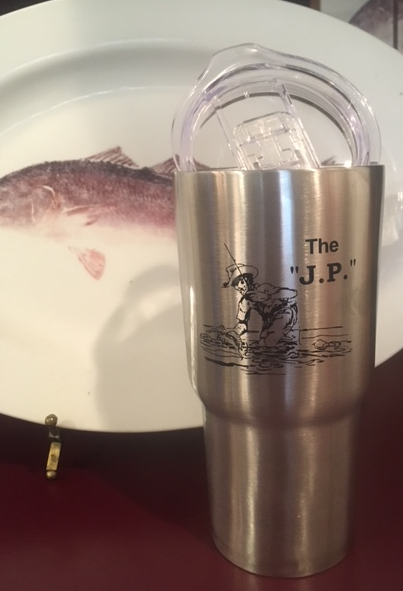
These handsome 20oz Frio Tumblers will be available this year for $20 each at the Thursday Night Captain's Meeting!
These top quality Insulated stainless steel tumblers feature the "J.P." logo and precision sealed, slide closure lids. Perfect for the car, truck, boat or bar!
There are only a few still available, so be there early before they are gone!
This tournament ended on
May 20, 2017
Tournament Stats
If you would like to donate directly to the JPGMFT Scholarship Fund...
Tournament Fast Links
Tournament Info
2017 JP Griffon Memorial Fishing Tournament
May 19, 2017
www.thejp.org
Tournament Contact:
Robert Griffon
713-248-7729
rgriffon@rjgriffon.com
May 19, 2017
www.thejp.org
Tournament Contact:
Robert Griffon
713-248-7729
rgriffon@rjgriffon.com
Tournament Boundary Map
Just click on the map and scroll around. You can pan (click and drag), zoom (mouse thumbwheel), and add the Google Earth image by clicking the Satellite box in the lower left corner. Click the menu icon to snap straight to the selected Boundary.